How to Set Up Monitoring Alerts in Solve’s Clarity Connectivity Management™ Platform
In In industrial IoT (IIoT) environments, issues don’t always show up as obvious failures. Devices can remain online while quietly behaving the wrong way—sending far more data than expected or not sending data at all. Left unnoticed, these issues can lead to unexpected costs, gaps in visibility, or unnecessary field visits.
Monitoring alerts in Solve’s Clarity Connectivity Management™ Platform provide an early warning system that helps operators detect issues before they escalate.
Instead of manually reviewing usage reports or waiting for a shockingly large invoice, operators receive automated notifications when usage crosses defined thresholds.
For teams managing distributed devices, remote infrastructure, or multi-site fleets, alerts make it easier to spot issues early and take action before they impact operations.
What Monitoring Alerts Do
Monitoring alerts send automated email notifications when a SIM’s data usage crosses a defined threshold. These thresholds can be configured using upper and lower limits, depending on when you want to be notified.
Lower thresholds are typically set at a “warning, you might have a problem” level. Upper thresholds, in contrast, mean “you definitely have a problem.” These alerts are all completely customizable for each customer’s unique application.
This flexibility allows teams to detect common issues in IoT deployments based on unexpected spikes in data usage.
It’s important to understand that alerts do not automatically bar or shut down a SIM. The notification simply signals that something worth investigating has occurred. The decision to take action remains with the operator. Solve Networks’ customers that operate mission-critical applications will never have plans that cease data usage without their consent.
For example, if a remote monitoring device suddenly begins using five times its normal data volume, an alert can notify the operations team immediately. From there, they can determine whether the spike is due to a configuration change, a software update, or a potential security concern.
You can receive these alerts via the vast library of APIs available in CCM, whether you prefer email and API alarming or just one.
The Four Types of Monitoring Alerts
Solve’s platform provides several alert types so operators can monitor usage at the level that makes the most sense for their deployment.
Whole Company Alerts
A Whole Company alert monitors every SIM within the organization. If any SIM exceeds the defined threshold, the platform sends a notification. This type of alert works well as a broad safeguard across the entire deployment, helping identify unusual behavior that may not yet be tied to a specific device or project.
Subscriber Alerts
A Subscriber alert applies to a single specific SIM. This approach is often used for high-priority devices or assets where usage patterns are predictable. If that individual SIM crosses the defined threshold, the alert is triggered.
Subscriber Group – Aggregated Alerts
An Aggregated Subscriber Group alert monitors the combined data usage of all SIMs within a group. This is particularly useful when SIMs are organized by project, location, or operational unit. Instead of monitoring each SIM individually, operators can track the overall usage for the group and detect when aggregate usage exceeds expectations.
Subscriber Group – Individual Alerts
A Subscriber Group – Individual alert monitors each SIM inside a group independently. If any single SIM within the group crosses the defined threshold, the platform sends an alert. This option allows operators to manage large deployments efficiently while still catching anomalies at the device level.
Setting Up Your First Monitoring Alert
Creating an alert inside the platform is straightforward.
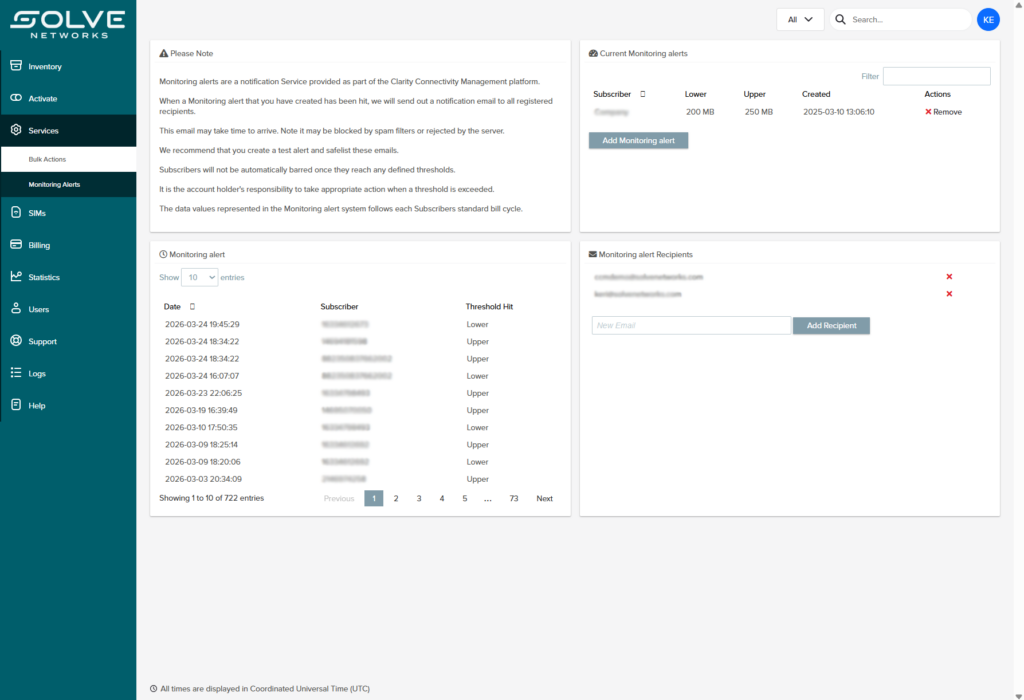
- Navigate to Services within the platform.
- Select Monitoring Alerts.
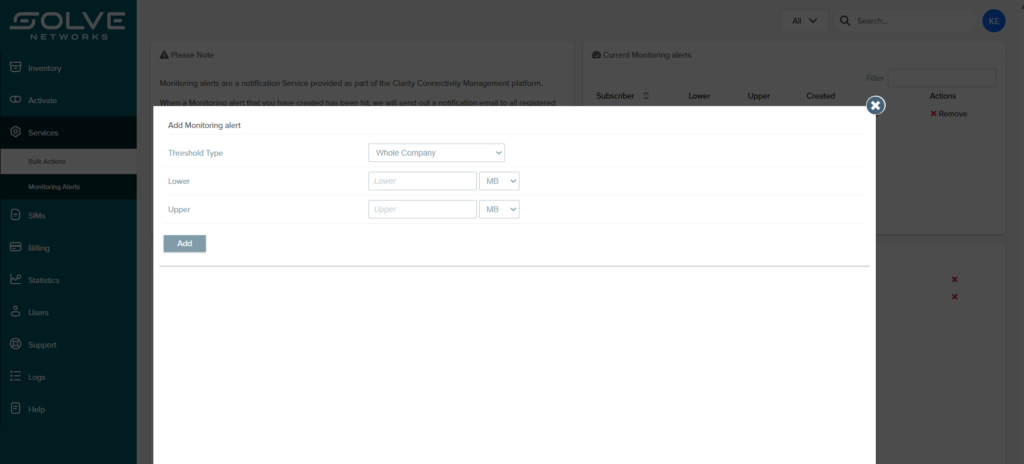
- Click Add Monitoring Alert.
- Choose the threshold type you want to monitor.
- Define your upper and/or lower thresholds.
- Enter the email recipients who should receive notifications.
- Save the alert.
Once configured, alerts trigger automatically whenever the defined thresholds are reached. Triggered alerts can also be reviewed within the platform dashboard, giving operators a record of when thresholds were exceeded and which devices were involved.
Smart Threshold Strategies
The technical setup is simple, but the real value comes from choosing thresholds thoughtfully.
A useful approach is to combine both lower and upper thresholds.
A lower threshold early in the billing cycle can serve as a fleet health check. If a device that normally transmits data daily suddenly shows little or no usage, it may indicate a connectivity issue, device failure, or power interruption.
An upper threshold serves as a pre-overage warning. If a device begins transmitting significantly more data than expected, the alert allows operators to investigate before the usage continues climbing.
Together, these alerts provide early signals for both silent device failures and unexpected usage spikes. Both situations can quickly escalate into operational or billing issues.
Why Monitoring Alerts Matter for Industrial Deployments
Most IIoT devices are not located in offices or data centers. They are deployed in oil and gas fields, transportation infrastructure, environmental monitoring sites, or other remote environments where physical oversight is limited.
In these environments, someone is rarely watching the device in real time.
Monitoring alerts provide a scalable way for lean operations teams to maintain visibility across hundreds or thousands of connected assets. Instead of continuously reviewing dashboards, teams can rely on alerts to highlight unusual activity that requires attention.
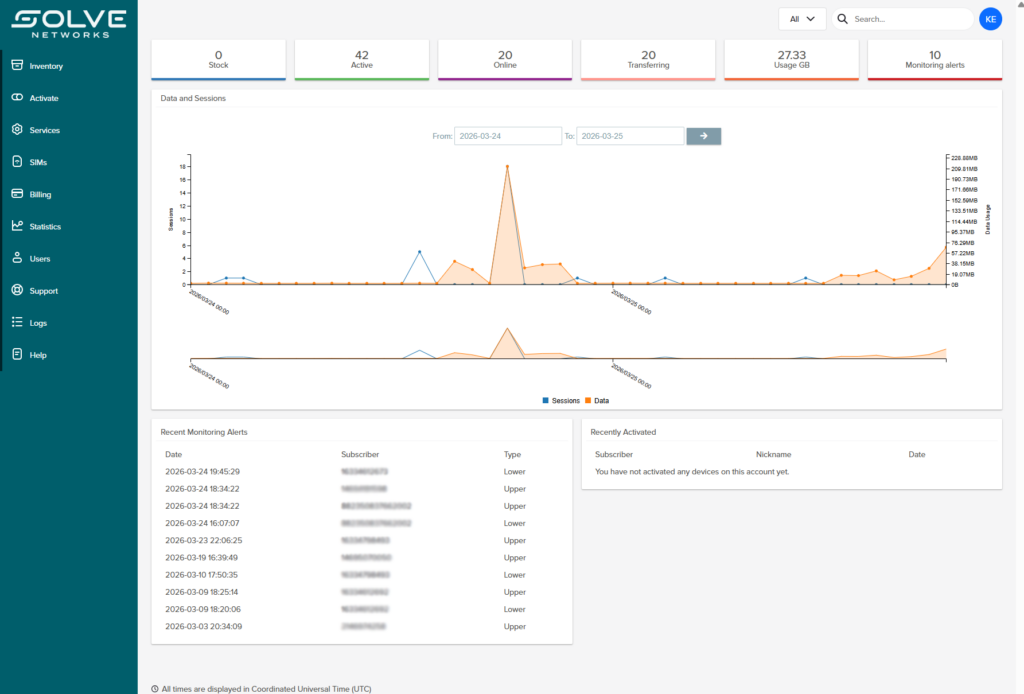
This approach helps operators detect misconfigured devices, compromised SIMs, or connectivity failures early. Catching these issues quickly can prevent unnecessary field visits, reduce troubleshooting time, and avoid unexpected data costs.
Stay Ahead of Connectivity Issues
Monitoring alerts are one of the simplest ways to improve visibility and control across a distributed IIoT deployment. With the right thresholds in place, operators can identify anomalies quickly, investigate issues sooner, and maintain confidence in how their connected assets are performing.
If you would like help configuring monitoring alerts or optimizing how your devices are managed, the Solve Networks team can help.
Talk to a Connectivity Expert to learn how Solve helps organizations monitor, manage, and scale IoT connectivity across complex environments.